
Theme by GlowBall
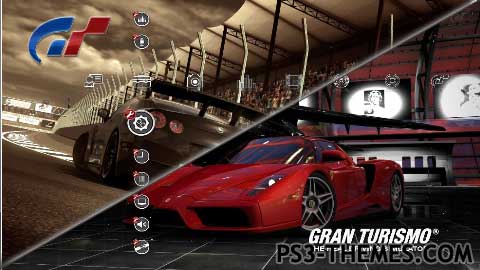
A theme that changes between the 8 backgrounds automaticly without rebooting the XMB or pressing any buttons. The timing between each image changing is 8 seconds. This will be a new way of creating themes and I will do a tutorial on how I done this soon. Icons from alba’s GT5 theme (I added the missing ones for 3.70). Hope you like it Let me know if you think 8 seconds is too long or not 🙂
Download Here
Download Here
hey dude i have make a “fast” video tutorial about the slide show effect but my 2nd pc is not so fast ^^ U can see it in 1-3 hours on youtube (~12.00 p.m. / 0:00)
Click my name to join my channel bye 😉
made another theme same problem onemanarmy could u upload your own slideshow sample people could follow that works, cuz wit glowballs slideshow sample im stuck at the same spot….unless theres more than 2 people that got it!!!
good lookin…i need this, was waitin for da slideshow to come out…is there any way to make the walppapers fade
But why need “normal” people like me the folders/exes ? I only need the main folder/exes to make the slideshow effect and his tutorial was about the slideshow and not about the other functions of his other folders and exes…
@Droopysp
I can make a example 😉
U can find it today or tomorrow at my yt channel 😀 click on my name to join my yt channel .
could u youtube an example so this theme wont reach 100 comments
BTW : My next theme will be done with this tutorial I have to put it into practice…
@1MenArmyProduction I know your point here was to give the download with the intention to help others that fine and thanks, but I want to tell you something about the “folder/exe”. Glowball in the “folder/exe” give to us files thats is not easy to find. In that pack in the folder bin you can see a file called gtf2dds.exe or dds2gtf.exe, and others and this files are very important tools used in the process of convert gtf to dds helping in the process of making dinamic themes for example. In this pack you can find other very important “exes” to. Another point its that this pack its not easy to find and Glowball give it to us the files extra with the best intention. Thanks Glowball for the tutorial and files. JAMZ and 1MenArmyProduction thanks for the fix error. And don’t delete the files that Glowball give to us only replace the files fixed because in that folder are other important tools “exes” that you can use in future. This message is not to create controversy just to clarify that point all of you here do a great job 🙂
No! You don’t need copy the 6 files to the slideshow folder! You drag and drop the slideshow.xml to the orginal folder (bin) at the raf_compiler.exe
yea got all 6 files in the slideshow folder…when drag it the tmp folder pops up and thats it, and can it work wit only 5 wallpapers and yes i edited the js and xml to 5 wallpapers
@Droopysp
Do you have drag and drop the SlideShow.xml to the raf_compiler.exe at the bin folder ? This works fine for me 😉
@Glowball
I never said that all people delete your files an load my ones!
I only was helping out…
And why we need all the other folder/exe in your uploaded file ?
I only work with my “edited” files from you and it work fine for me i dont have any problems.
@ Droopysp
Do you have the raf files in the same folder as slideshow.xml before you drag and drop?
@ Jamz
U r right he was helping everyone out. But telling people to delete my files and download his is wrong. Anyhow not to fussed so long as people can make their own slideshow theme it’s all good 🙂
the slideshow.raf isnt poppin up, when i drag the xml file and on the new link u uploaded everything is fixed right (the ” thing) cuz i couldnt find the typo
help please
i dont think that 1men ment to do it it this way, he was just helping others out, and fixing the problem that we both found,. now im not here to cause an argument or nothing, i love the work both of you do and appreciate this tutorial, just see it from his eyes next time, he thought he was helping others out.
Anyway your next tutorial sounds juicy, cant wait to get my teeth into it 🙂
It’s cool pal. For next time if my files need fixing lol let me know and I will fix them.
Hoping to get a tutorial about getting started on dynamic themes from scratch. With some sample models and backgrounds etc. 🙂
Hmm 0.O
sry dude I dont won’t steal your work i only want to help 🙁
i know a little bit how u feeling now if i see people using my created icons it’s bad to see this you are no in the credits but i can delete the file that i uploaded… SRY
And all knew that u r the guy that make it possible to make own dynamic thmes 😀
@ Droopysp
Go for it fella. Oh don’t forget the ” in the .XML. Enjoy 🙂
@ 1MenArmyProduction
What r u on about. Looks like ur stealing credit for my work. I said sorry and I meant it. Not my fault u can’t fix .XML. Jamz probably figured it out straight away. It’s guys like u who stop good people like myself from helping and sharing information etc. I ask u what have u done that has made a difference to the ps3 scene?
@GlowBall
Babes is my first middle and last name, lol
i couldnt wait for this tutorial to come out…im on it, thanx and god bless…got some great ideas for it
I have upload all files we needed to make the slide show effect and delete all files from glowball that nobody need to do this…
And I fix the SlideShowTheme.xml u can download it here: http://www.mediafire.com/?nfrvk21w9219nqc
PW: 1MAP
@ 1MenArmyProduction
Sorry for your time wasted fella lol. The theme folder was added in quickly cus I wanted people to have a full set of icons. Thanks Jamz for the fix man 🙂
Yeah… maybe… he steal my time I want it back xD
not a problem mate, im sure GlowBall put it in to confuse us lmao.
big thx dude !!! 😀
cant’ edit comment so here it is again, no speach mark anim=”Anim_1.jpg
with speach mark anim=”Anim_1.jpg”
i had this problem also, check the xml file and you’ll notice it says without another speach mark, simply add the other speach mark so it looks like this hope this helps you out bro
Nobody can help me ? 🙁
ok i finished now to rename the file but if i try to drag&drop the xml file from “Theme” to “bin” p3tcompiler.exe give me the cmd this erorr message: …\Theme\SlideShowTheme.p3t:
not well-formed : line 129, column 4
failed.
press key…
What I doing wrong NOW ? 😀
ok that was helpfull but now if i rename the SlideShow.raf file to Anim_1.jpg they are still a raf file not a jpg
this happened to me aswell, so instead of copying the files, i just dragged the .xml onto raf_copiler.exe in its original folder.
(my dds plugin vers. is 8.23b)
I only get a tmp folder and this contains this files: http://s7.directupload.net/images/110919/w7tpom5v.jpg
What I do wrong ? o.O
legend mate, come here and give your new best friend a kiss 🙂 only joking mate, your a legend !!
Here is my tutorial it is fairly simple http://www.ps3hax.net/showthread.php?p=251612#post251612
Alright thanks 🙂 i’ll be waiting for the new tutorial
@ TheNextProdigy
Here is the link toedit PS3 script files (.jsx)
http://www.ps3hax.net/showthread.php?p=231248#post231248
My other tuorial should be done by tonight :).
@Glowball
Get that tutorial up! Im interested in dynamic themes (finally), You have a tutorial on editing scripts and junk right? Mind putting a link 😀
@ TheNextProdigy
Yeah there is a limit but that depends on what settings or type of background file you use. With my settings (DDS no alpha) you can fit about 15 backgrounds. At the minute this is a basic script which tells the PS3 to change the background image in a set amount of time. You can edit the script to tell the PS3 to make the image slide off screen or fade out but for now I need to get used to the tools I have.
Wow wasn’t exspecting my theme to be uploaded so quick 🙂
Thanks for the comments guys just finishing of my tutorial and I have some more themes to upload today also.
@ xXDavid_98Xx & Faxtron
When I have uploaded my tutorial you guys can test it by making a babes theme. I want to concentrate on 3D modeling for dynamic themes.
@ OPTIMUS
I too am a big fan of GT but yeah GT5 was a disapointment especially after a long wait lol 🙂
Woah, This is cool. Is there a limit to how many images can be added? If not, then technically if you made the speed of each image right, you could make basically like a moving background. Not like a dynamic theme, but like maybe an image with one work like Ps3 in a black background with different colors for each lets say 6 backgrounds…… if you get it, is that possible?
great theme shame about the game. keep the rocking themes coming.. optimus you 2 mg rising ftw
thanks mate, i have responded there 🙂
@JAMZ: Hey mate! In my MGS theme I left a link for the background you asked me: don’t know why, it was waiting for moderation, but now it’s accessible, so you can get your background! 😉
Niiiice job, mate!
I always been a great GT fan since its debut on PS1 (although I have to say this GT5 is the first game of the series that disappointed me a little 🙁 …)
But this theme rules! 😀
finally the best theme for the best driving game and i agree with faxtron that you should make one of babes but dont use the pictures with the website name
BTW : One theme make like this with beautiful girls would be great !
Thanks Bro ! Very good theme and most I like is that is different and brings a new way to appreciate and create dynamic themes.
Wow i love the new original dynamic thems that are coming out, cant wait for tut
I have to download that, my father will love it! Good work! 🙂