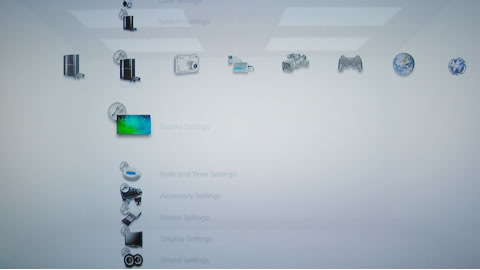
About PS3 Themes
Welcome! PS3 Themes is your primary source for customizing your Playstation 3's XMB. All our PS3 themes are free to download.
Top Rated Themes
Most Popular Themes
- PlayB3yond - 191,577 views
- MGS4 #3 - 116,061 views
- iPhone PS3 Theme - 108,846 views
- Vida Guerra 18+ - 94,190 views
- Metal Gear Solid 4 - 90,101 views
- GT5 Theme - 76,874 views
- PS3 Theme by Sudi - 75,913 views
- Vista Ultimate - 74,221 views
- Neon - 66,985 views
- Okami - 59,260 views
Respected Sites
PS3 Themes >> Download Theme
PlayB3yond
Posted by: PS3 Themes on Nov 20 2007 in Gaming section. Viewed 191,578 times
Take a Second to Rate This Theme: 


Latest News
01/18/08: We'd like to remind everyone to rate the themes and leave a comment on the themes you download. The theme authors and I'm sure all other visitors appreciate this aswell.
Theme Categories
Site & Forum
PS3-Themes.com is a Playstation 3 themes fan site and is in no way affiliated with Sony Corporation. All trademarks and graphics are owned by their respected owners/creators. Privacy Policy


November 24 2007
hello
November 24 2007
very good
November 25 2007
very goodd
November 26 2007
nice
November 29 2007
GREAT
December 3 2007
Cool!
December 6 2007
mmmm
December 14 2007
wow. you stole most of my icons. thanks for the credit.
December 20 2007
very well done!!
December 31 2007
amazing… testing
January 11 2008
Nice. I like this one the most,of all the themes that are out.
Nicely done
January 11 2008
Looks mint, when I get my PS3 I’m using it!
January 12 2008
Without a doubt, the SINGLE GREATEST THEME out there for PS3. Barnone. Clear, concise, doesn’t make any stupid sounds when you go from icon to icon, they fade out when you aren’t in their column (minor gripe - with the icons faded just a tad more) but other than that, this theme ROCKS. You have no idea how many compliments I have received for it. Using Sony products for each column it tops too. Very thoughtful, very well done, and most of all…VERY BAD ASS!!!
January 12 2008
Whoops, typed it in a hurry - VERY EXCITED ‘BOUT DA THEME!!
- so sorry for my few letter slip-ups folks.
January 14 2008
a little bit boring
January 16 2008
gr8 idea!9/10
January 23 2008
BORING….I WOULD NEVER GET THIS THEME….I COULD MAKE A BETTER THEME WITOUT TRYING
January 24 2008
sweet
January 25 2008
looks boring
January 31 2008
its a good theme but why only one background very nice icons mate ……..
February 5 2008
its not boring its supposed to be simple..
February 6 2008
Awesome icons - either borrowed or borrowed by others, I did change back to standard background as I like the dynamic time effect and the white makes writing hard to read.
February 6 2008
very nice theme with great high quality icons compared to most of the other themes ive dowloaded. Properly scaled and have a streamlined look. If the white background affects the text for you just look for another background and put it on your ps3, anything will go well with this theme
February 29 2008
I suggest changing the brightness setting on the PS3 for the background (its in the theme options after you install it) so that you can read the text easier without looking for a different background.
April 11 2008
very unoriginal
May 7 2008
Hey guys thanks for the feed back on my theme, It’s awesome that my theme is #1 here on the the best site for ps3 themes. I spent lots of time making each icon. For the record, I made every icon myself. For anyone that says I took/copied any icons they are either a thief or have a great mind and thought the same as me. THANKS EVERYONE
May 18 2008
Wicked theme. I love it. Looks really cool and is very simple. Great job.
June 1 2008
how do i get it?
do i have to be on my PS3 online?
June 1 2008
thanks so much! this skin is awesome
for those of you who are having problems like i was this is what you do.
1) plug your USB stick into your Computer/Laptop.
2) Create a folder named “PS3″ (in CAPS) and inside that folder create another folder called “THEME” (also VERY IMPORTANT you put in CAPS, or it will not work).
3) Put all the Themes you want into that folder.
4) Plug it into the PS3 and then go to the place you change your themes.
5) Go to “Install” then it should find the USB stick and go to the folder and then you should find your skins in there!