
Theme by GlowBall
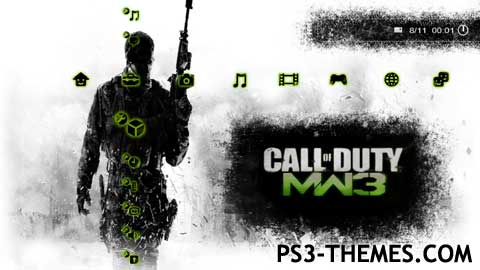
Call Of Duty: MW3 Animated UPDATE – For all firmwares including 4.0 🙂
This animated theme is different to all others as the animation (video clip) is at built in the bottom quarter of the screen. In my opinion this is the best animated theme I have created so far :). Icons I created myself.
As always this theme is free so give an opinion or simply say thanks
Enjoy and checkout the preview
Download Here
right on!!
downloading, thanks!
crazy nice job
n1
can you give me the background?
when i edit it it dosent have the background…
Thanks! Love it 🙂
cool really like it
Awesome
Thanks 4 this I really really love CAll of duty:MW3
Nice bro, just getting into making themes. I’ve made a few in the past, but have never made them for people to use. Mainly made them for me. But yeah, hopefully I can do this some time.
Awesome, appreciate it….
It is of the hoork
Thanks man
Brilliant work! Thank you!
Wow! Thanx dude! You really are skilled. Cheers!
Skilled
Glowball. The most epic theme maker on this website. Your a legend with themes bro. Hey can you make a dynamic glaxy theme? If i see any themes made by you, i download it without qestion. Keep it up.
Its AWSOME
Thank God this is the best theme ever!!!!! Please make one for Black Ops and Black Ops 2!!!!!!!!
doesnt read for 4.11 🙁
hi their i have the firmware 4.11 and i would very much like this theme, so would you kindly, please update so that it is available for a firmware of 4.11
It would also be greatly apreciated if you could send it to me via e-mail,
evang6343@gmail.com
thanks
very good
should i get it
it dosen´t work on my ps3, it works only 2 seconds an then the screen will be green 🙁
Did not work for me?
It was just green on my ps3?
I didnt get the clip in bottom left or background or anything like that?
Solution please?
BEAUTTIFUL!!!!! …..
@ hadasme21
What are you talking about the theme is for firmware 4.0 and it works on firmware 4.0. I know this because I am on firmware 4.0. If it doesn’t work for you then it’s your console not the theme.
Hello your theme is great, but plz update the theme for 4.0 plz and if you can send me the updated theme to my email hadasme21@gmail.com
I have created a tutorial of how to create this style of theme here http://www.ps3-themes.com/forum/ps3-themes/how-to-create-animated-themes-tutorial
🙂
Now this theme is great.
Very well done… Thanks 🙂
Apologies for going off topic Glowball but would it be at all possible to put your Killzone snow effect on this winter image (http://fc06.deviantart.net/fs39/i/2008/366/7/2/Christmas_wallpaper_by_JPeiro.jpg) and then put on the Motorstorm arctic edge icons to make a great christmas dynamic theme. I’ve already got permission from the illustrator.
Please reply and thanks for all the fantastic themes so far!
thanks
dynamic themes are looking pretty good now. I didn’t expect them to allow so many frames. nice job.
@ nickthatch12
The icons are fairly simple to do here are the steps I took.
1. Opened up all the original 3.70 icons in photoshop.
2. Selected the rubber tool and changed the rubber style to a distorted effect.
3. Apply the rubber on the edges only but change the style and angle of the rubber on each icon.
4. Saved all of them to a folder.
5. Created a style of colour black with a green outer glow.
6. Automate the style to the folder of icons I saved.
There you go not so hard at all. I could of done an automate for the distorted effect but then they would all look the same. If you look at the icons closely you will notice that the distort is different for each similar but different. This adds depth to the theme.
@ william
Sorry fella themes don’t not have sound in the background and probably never will. Maybe PS4 lol 🙂
So how did you use photoshop to make the icons then? I’m not gonna take your icons and remake them or anything I just want to make my own.
doesit suppose to have sound or not because in yht video it does please respond
@ nickthatch12
I used photoshop to create the icons and I would recommend it 🙂
how did you make the icons and what programs work best for doing so?
@ nadine
yeah this works on fw 4.0 now enjoy 🙂
@ charli el
It was the hard of Seclairty31 who figured out the new limitations for raf files here http://www.ps3-themes.com/forum/ps3-themes/sony-update-4-0
GlowBall, How have you done that already work with FW 4.0?
does it work for 4.0 ??? did you fix it ???
@ Steven
Try it now cus the download will be the 4.0 firmware version 🙂
it don’t work anymore wont show up
I have uploaded the firmware 4.0 update will be approved within 1-7 days 🙂
Feels like I’ve spent my life here the last 2 days lol 🙂
yeah i updated my ps3 and it stopped working wtf? can you make an updated theme our something?
this theme was cool but i updated my ps3 and it stoped working>?
@ RevERenD_LuVJoY
Yeah it’s sad but true I am working to try and fix today there is a topic in the forum about this and I will update with any info I have.
Sony where’s your Christmas spirit hey 🙁
This theme needs to be updated. It doesn’t work with the 4.0 software update, but it worked fine before.
thx
its not working for me wont open file not supported 🙁