Theme by TheNextProdigy
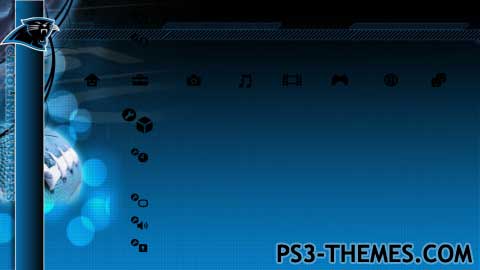
This is a SD/HD theme
This was made for my favorite football team
Custom Icons
Download Here

#1 Resource for PS3 Themes
Theme by TheNextProdigy
This is a SD/HD theme
Custom Icons
Download Here
Hire the the top fireplace inspection that is now available in addition with reasonably pricing now only!
Hire a top bls training that is now available in addition at reasonable prices now only!
Find the the top phoenix seo scottsdale that’s now available in addition at reasonable prices now only!
very nice theme =)
Ugh… my computer’s gone crazy and I couldn’t even connect to the site!
Well, that was the intention: having all the icons in one page, so that you can simply pick them up one by one and edit as you wish.
(If I had put them separately, I would have finished in 2025… :D)
That’s why I put each one of them inside a “box”: I marked the four angles around the icons to highlight the right size of every icon, so… with a graphic program, you just need to select an icon (with the rectangular selection tool) by following those marks, then copy and paste it into a new image of the same size (128×128, 170×128 and so on, according to the size of each icon) and edit the icon as you wish.
Ok, in other words, yes: you can crop them out one by one (simply following the marks I’ve put)… 😛
Ok, You said that all i have to do to get the icons is just right click and save as or save image…… well when i do that it saves the whole page it doesnt give me each one separately, do i crop them out or what?
What?
Well, I don’t understand, I even written the icon’s name under each one of them… 😉
I simply placed the icons following the XMB order, so:
in the upper side (from left to right) there are the main icons (User, Settings, Photo, and so on) and under each main icon, I placed the related sub-icons (which means that under “User” you’ll find “New User” and “Power Off”, as well as under “Settings” you’ll find “System Update”, “Game Settings”, “Video Settings” and so on…)
The other icons are “Setting Item”, “Notification” and the standard cursors.
To the right of the image there are the General Icons (“Media Servers”, Memory Stick” and so on)
And in the lower side you can see the “File/Album” icons which are related to the “Photo”, “Music”, “Video” and “Games” main icons…
When building a theme with PS3 Theme Builder, you find the icons in the same order and you just need to follow it.
So… what’s the problem, mate?
Hey I’m a little stuck…… i saved your icon thing but when i try to open it the whole page of icons shows up and its confusing me :'( Can’t you just upload on like media fire or something please 😀
Is That A Request? 😀 I’ll Get On It
You Know, Those Icons Would Probably Look Good In A Steelers Theme!
Uhm… yeah, sounds good! 😀
I might make some sort of surreal spacy type theme
Come on, guys, be creative!
There are lots of games out there, for example, or you could also make something “abstract”… 😉
Hey nice theme man! the Panthers are my my team, too. I know they had a horrible last season, but I will stick with them them till the very end, just as a captain sinks with his ship. 😀
Yea, I have the same problem, too. I don’t know what to make a theme on for some reason. 🙁
The next theme will have the icons, I just dont know wat it should be about
Yeah… good style, mate!
Now, I’m waiting to see something made with your “new icons”… 😉