I’m sure of one thing, and not sure of two:
Sure of:
I don’t want credit!
Not Sure of:
What the Mac uses for XML editing.
Why the Font option 3 inevitably crashes the Theme creator GUI.
However, as for sharing the the creative processes with like user… i’m all for that.
Those sub folder icon are different dimensions ie.
icon_video_default
icon_video_album_default
228×128, 32-bit PNG
But I bet you knew what since you have those cool main icon at 128 X 128; and the craZy pointers at 48 X 48.
Only one pointer had the “hot spot” coordinates off.. a hot spot is the tiny pixel where the pointer will queue to change from hand to pen to finger, etc, so on the ‘Pen’ icon had it’s ‘hot spot’ located (think 48 x 48 square now) in the lower left hand corner (not on the tip of the icon pen). Meaning your pen would be hovering 36 or so pixels off to the right. In your theme creation software look for any adjustment to X/Y pointer coordinates. On the Mac’s best graphics progy, create a new 48 x 48 template and layer your pen on there to find where the pixel is on the pen’s tip.. go back to the theme creator software and adjust the coordinate, or open the XML file up for editing and learn by intuition/comparing the line to edit. Congrats on your two themes!
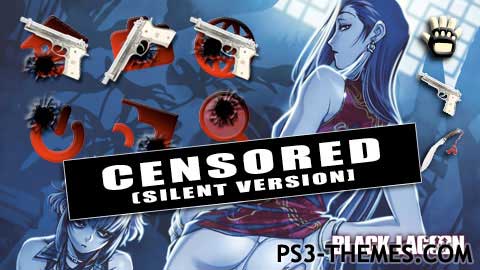
the “censored” stamp is because it A) looked cool and B) had no gun shot sounds. lol… anyway, i’m not familiar with PS3 Theme Builder since i use Theme Creator for the Mac. but… if there’s any problems with it, i’m not really aware of them other than that the sub-folder icons for the video section don’t work. not sure why… but i’ve seen other themes with the same issue on the same icons. i’d fix it all, but i’m not really great on coding or anything. anything you might be able to help with would be great. i can always resubmit the changes and give you credit for fixes if you email me the file. 🙂
Loaded this great them in PS3 Theme Builder version 3.0, Not sure why (other than hype to market) that it has the CENSORED stamp, but it is cool anyhow.
So:
It crashed the progy, so I examined the xml file that the theme was built on.
changed the _font selection_ value from 3 to 1
removed the _setable_ header
And as I was browsing the cool pointers. Found this on the Pen icon selection, found this lil’ bug
Value of ’44’ is not valid for ‘Value’. ‘Value’ should be between ‘Minimum’ and ‘Maximum’.

I’m sure of one thing, and not sure of two:
Sure of:
I don’t want credit!
Not Sure of:
What the Mac uses for XML editing.
Why the Font option 3 inevitably crashes the Theme creator GUI.
However, as for sharing the the creative processes with like user… i’m all for that.
Those sub folder icon are different dimensions ie.
icon_video_default
icon_video_album_default
228×128, 32-bit PNG
icon_photo_default
icon_photo_album_default
170×128, 32-bit PNG
But I bet you knew what since you have those cool main icon at 128 X 128; and the craZy pointers at 48 X 48.
Only one pointer had the “hot spot” coordinates off.. a hot spot is the tiny pixel where the pointer will queue to change from hand to pen to finger, etc, so on the ‘Pen’ icon had it’s ‘hot spot’ located (think 48 x 48 square now) in the lower left hand corner (not on the tip of the icon pen). Meaning your pen would be hovering 36 or so pixels off to the right. In your theme creation software look for any adjustment to X/Y pointer coordinates. On the Mac’s best graphics progy, create a new 48 x 48 template and layer your pen on there to find where the pixel is on the pen’s tip.. go back to the theme creator software and adjust the coordinate, or open the XML file up for editing and learn by intuition/comparing the line to edit. Congrats on your two themes!
the “censored” stamp is because it A) looked cool and B) had no gun shot sounds. lol… anyway, i’m not familiar with PS3 Theme Builder since i use Theme Creator for the Mac. but… if there’s any problems with it, i’m not really aware of them other than that the sub-folder icons for the video section don’t work. not sure why… but i’ve seen other themes with the same issue on the same icons. i’d fix it all, but i’m not really great on coding or anything. anything you might be able to help with would be great. i can always resubmit the changes and give you credit for fixes if you email me the file. 🙂
Loaded this great them in PS3 Theme Builder version 3.0, Not sure why (other than hype to market) that it has the CENSORED stamp, but it is cool anyhow.
So:
It crashed the progy, so I examined the xml file that the theme was built on.
changed the _font selection_ value from 3 to 1
removed the _setable_ header
And as I was browsing the cool pointers. Found this on the Pen icon selection, found this lil’ bug
Value of ’44’ is not valid for ‘Value’. ‘Value’ should be between ‘Minimum’ and ‘Maximum’.
thank you