
 Log In
 Register
 Home
Home


 Topic RSS

Forum Contributor

 Offline


@ iecchi
Whats in the tmp folder?
 Offline

 Offline
You did everything right. That's what your suppose to have in the tmp folder. You just need to drag the .raf file into the "Theme" folder to replace the other .raf file in the Theme folder and that's it. To compile the theme you would have to drag the XML file in the theme folder to the P3t Compiler.
Offline

@jaydee1003
THANK YOU!!! from the radz vido i didnt see any tmp folder so i thought i did something wrong and from the glow ball tut he said if i have a tmp folder there must be some space in my path but i cant find any. and also my .raf icon look completely diff from radz video so it hard from to find w/o looking at the the end.
Offline
@ iecchi
Lol no problem..  glad to help...when I first created my dynamic themes I just ignored the tmp folder and it worked fine without any problems lol.. It's just a temporary folder, it shouldn't affect anything.

Oh...finally i have all ads files and everything, but...i use MAC and compilers are for windows. any idea?
thanks
i keep getting this error when i try to make raf file this is wat im getting 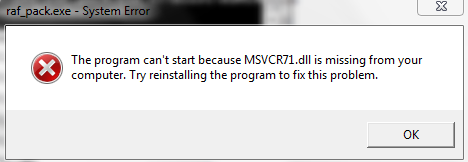
 can any1 help me plz good TUT by the way m8

Forum Contributor
 Offline
HD-DoN1 said
i keep getting this error when i try to make raf file this is wat im getting
RADZ said
HD-DoN1 said
i keep getting this error when i try to make raf file this is wat im getting
thanks m8 it worked i neer was ready 2 give up on it lol
thank again m8 
I tried to make one that was full-size instead of the window but when I try to make RAF file I'm getting tmp folder and no RAF file I have looked in the tmp folder but it's not there can anyone help me please thanks
Would be nice if you actually show the outcome at the end. ie. Install it on PS3 and show us what it look like.
Would u happen to know y my theme has a white flash?
Offline
I know old news maybe there's an easier way now not sure but want an ainmated theme n just keep geting a temp folder with gft n bg.dae s. Also a bg.dae.invbind cnt see error lig is here a way to tell problem, no spaces in my directories, all dds are 1mb not sure if it has do do with the image resize bicubic(best for smooth gradients) I dnt use that setting could that be it
1 Guest(s)
