
Theme by E-clipZe
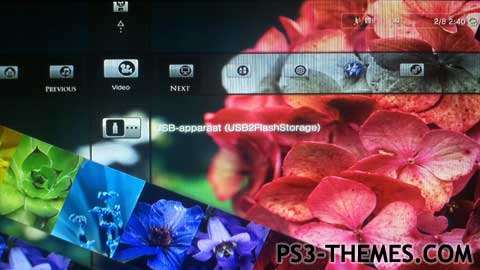
Very nice theme including a HD background perfectly edited for the XMB menu, and sliding pictures of flowers in different colours.
Icons from: PS3 THEMES: once you’ve started, you’re addicted! (Made by OPTIMUS)
I like these icons very much, thanks to optimus for making very nice icons and sharing his very good themes and icons!
Download Here
Hey,
How can i make the top right corner box small like the one you have in your theme here?
i love this theme its superb but when using the internet it takes the piss trying to go to next page it mouse.
fix it please.
other then that nice work 🙂
Oh man, what the hell happened?!?
I simply wrote the XML codes you need for the missing icons, that’s what I meant with “copy and paste this”… O_O
Ok, mate, try the solution you just said and let me know: if it doesn’t work, I’ll provide you the XML codes in another way. 😉
im working on a dynamic south park theme.
but i was on vacation so i could not finish it yet, it is almost done and i will upload it soon 🙂
after that i don’t know, maybe a dynamic bob marley theme 😛
thnx for checking it out 😀
but what do you mean with:
2) open the XML file and put this:
[just copy/paste these to be sure you don’t forget to write something]
i have to put what? 😮
i also thought of a solution if i got missing icons the next time, i can open the png of the icon i want to replace, and then open the icon i want to use for my theme and overwrite the old one in photoshop and save it 🙂
so next time my theme should have all the right icons 😀
Ok, mate, I checked, and I discovered that the dynamic editor uses the p3t compiler 1.80 (which is the latest released by Sony, but it’s based on the very old 1.00 version, anyway…)
Also, I noticed the XML files contained in the various dynamic themes folders are not fully updated, or in some cases they’re not updated at all.
Well, I’m pretty sure that’s the problem, and I think you could solve it this way:
1) make a backup of the XML file you use more often for your dynamic themes (so that you can restore it, in case something goes wrong)
2) open the XML file and put this:
[just copy/paste these to be sure you don’t forget to write something]
3) now save and try to create a “test theme” with it.
Hope it works, so let me know… 😉
Don’t mention it, bro: I’m always glad to know that someone likes my work and decides to use it for something else 😉
Well, yeah, much likely there are some differences between the editors, but… it’s weird: the internal assembler of the dynamic editor should be based on the same XML file which contains the same icon’s definitions; couldn’t be otherwise, since the id of the icons is standard (or the PS3 wouldn’t be able to recognize them)…
Oh well, I’ll check, and I’ll let you know!
Lol! Yeah, there’s always something to learn… 😀
So, what’s your next project?
no problem mate, its good to hear you like my themes! ur here a very long time and make very very very great themes so its good to hear you like my themes 🙂
and yes, these are the icons i was talking about haha 😀
yeah i noticed i was missing some icons but i cant update this theme anymore because everytime i create a new theme i edit the files from my last theme, thats not really smart so i think i will create back ups from now on 😛
but i hope i did ur icons right by using them for my latest theme’s.
About the minis icon, i copied ur icons to the folder of the dynamic theme editor and overwrite everything, but somehow it did not overwrite the minis icon and some other ones, i think there are some differences between the editors we use and some file names are not the same.
so, another lesson learned and next time i will pay more attention to it!
Thanks for ur reaction! 😀
Wow! Thank you so much, mate, I really appreciate! And I really like the themes you made (especially this theme and the Rainbow Fog/Clouds ones)!
So… THESE are the icons you were talking about, huh? You know, from the day I joined this site so long ago, I made tons of icons so… I didn’t know which ones you meant, when you told me about using them. Oh well, now I know! 😀
Oops, just one thing… there’s a missing icon (Chat Room Text) and I saw you’ve put a different Minis icon which has nothing to do with mine.
Also, you left the standard Video Uploader icon (it’s even visible in the preview image)
But you did a very good job!
Thanks again, mate!!! 😀